The University of Nebraska employee annual salary notifications are now available in Firefly.
To access your salary notification:
• Go online to Firefly.
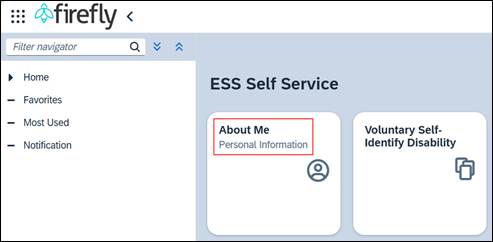
• Click the Employee Self Service tile, then About Me tile.
• Scroll down to Compensation and click on Salary Notification.
The salary notification will open in PDF format. Save the PDF and/or print by clicking on Download to Print at the bottom right of the screen.
This Annual Salary Notification link will remain in Employee Self Servie (ESS) until the following year and only the current year’s notification will be accessible. Request assistance from a campus help desk for any issues within Firefly or opening the PDF file. Contact your supervisor if you have salary questions.
NOTE: Not every employee at the University will receive a salary notification via Employee Self Service (ESS). Employees who do not receive a notification will see the following message, “Annual salary notification not available. Please contact your supervisor.”